Every food business in Davao knows the lunch-rush moment: a customer orders the bestseller, and the kitchen says it is out. The chicken was used up faster than expected, or the delivery came short and nobody noticed. On other days the opposite happens. Too much was bought, and part of it goes into the trash before it can be used. Both problems have the same root cause: nobody knows exactly what is in the kitchen until someone goes and looks.
This guide shows how restaurants, carinderias, cafés, bakeries and food stalls can do ingredient inventory tracking without a long count every night. It covers what to track, how a recipe connects a sale to your stock, how to set simple reorder levels, and how to log waste so you can finally see where the money goes.
Key takeaways
- You do not need to track every pinch of salt. Track the 10 to 20 ingredients that make up most of your food cost.
- A recipe connects each dish sold to the ingredients it uses, so stock goes down as you sell.
- Set a par level for each key ingredient: the amount you need on hand before service starts.
- Log waste every day. Spoiled, dropped and returned food is part of your cost, and you cannot reduce what you do not see.
Why ingredient stock is hard to keep track of
A retail store sells exactly what it buys. A kitchen does not. You buy chicken by the kilo, rice by the sack and oil by the gallon, but you sell plates of adobo, cups of rice and orders of fried chicken. Ingredients are also perishable, they come from several suppliers and the market, and different cooks may use slightly different amounts.
That is why many food businesses only find out about a problem when something runs out or the month’s food cost looks too high. By then, the money is already gone.
Step 1: Pick the ingredients that matter most
Make a list of everything you buy in a normal month and sort it by how much you spend. In most kitchens, a short list (meat, seafood, rice, oil, eggs, a few vegetables and your main sauces) makes up most of the food cost. Those are the ingredients to track closely. Small items like salt, pepper and spices can be checked once a week by eye.
For each key ingredient, decide on one counting unit and stick to it: kilos for meat, sacks or kilos for rice, liters for oil, pieces or trays for eggs. Mixed units (“half a bag”, “one tub”) are where counts start to drift.
Step 2: Connect each dish to its ingredients
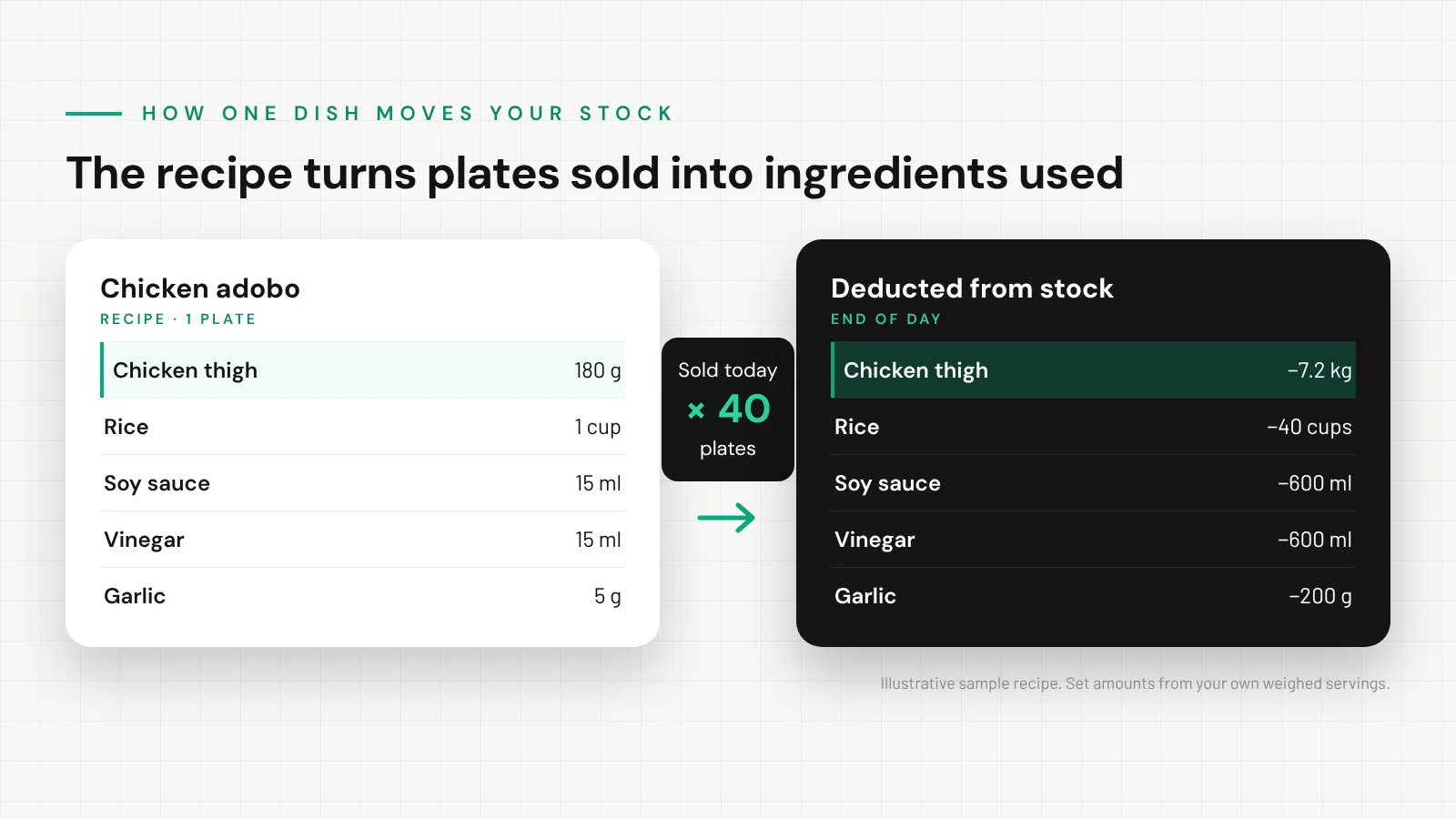
A recipe in an inventory system is a short list of what one serving uses. One plate of chicken adobo might use 180 grams of chicken, a cup of rice and small amounts of soy sauce, vinegar and garlic. When the cashier sells 40 plates, the system knows that about 7.2 kilos of chicken left the kitchen, without anyone weighing it.
Start with your 10 bestsellers. You do not need perfect recipes on day one. Weigh a few real servings, agree on the standard amount with your cooks, and adjust after the first week of counts. As a bonus, you will learn what each dish really costs to make, which helps when supplier prices go up.
Step 3: Set par levels and check them before service
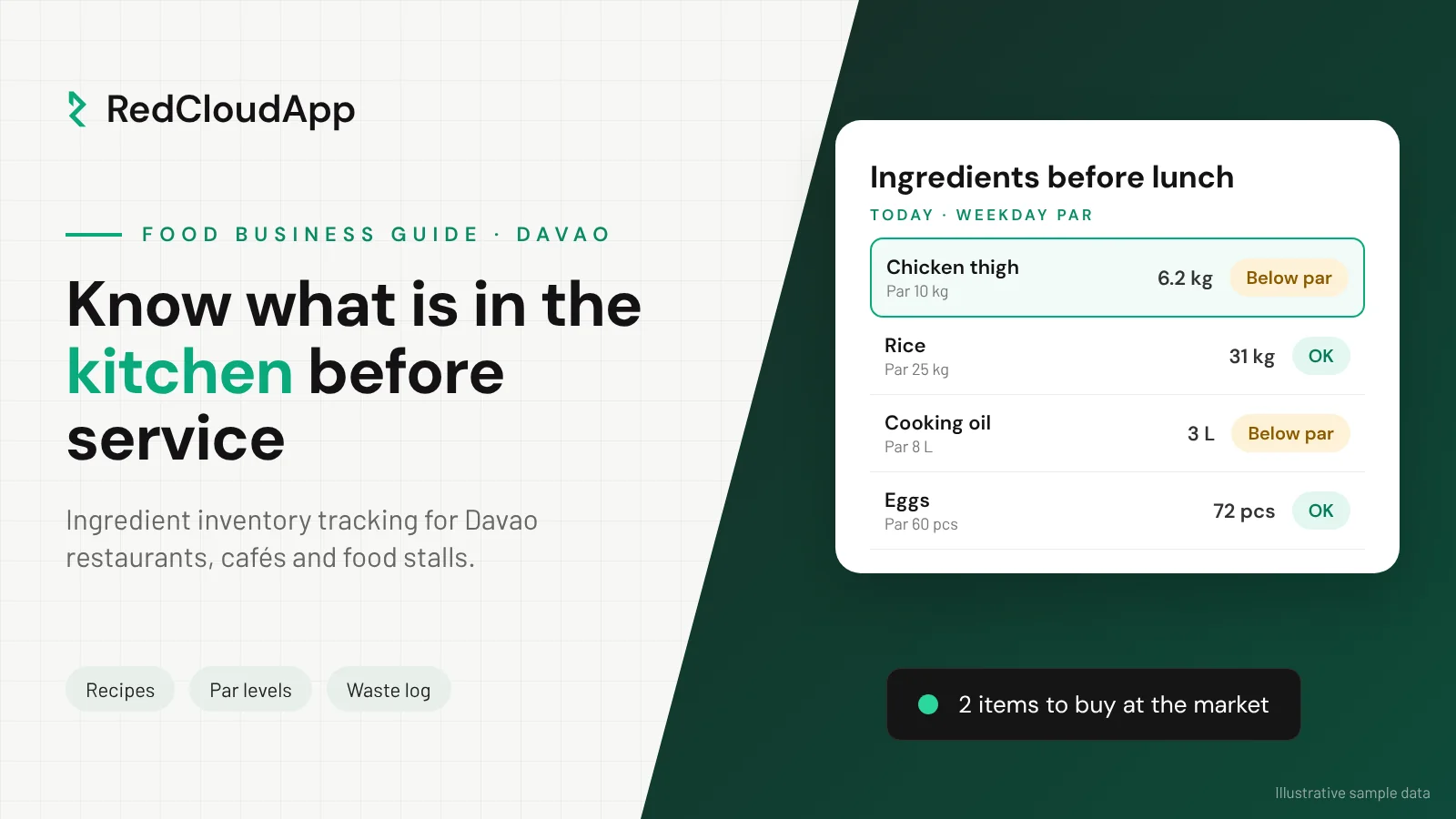
A par level is the amount of an ingredient you want on hand at the start of the day. If you usually use 8 kilos of chicken on a weekday and 12 on a Saturday, your Saturday par might be 14 kilos to cover a busy day. When stock falls below par, it goes on tomorrow’s order list.
| Ingredient | Unit | Weekday par | Weekend par | Check |
|---|---|---|---|---|
| Chicken thigh | kg | 10 | 14 | Every morning |
| Pork belly | kg | 6 | 9 | Every morning |
| Rice | kg | 25 | 35 | Every morning |
| Cooking oil | L | 8 | 10 | Twice a week |
| Eggs | pcs | 60 | 90 | Every morning |
Step 4: Check every delivery against the order
Short deliveries are one of the quietest ways a kitchen loses money. Weigh or count each delivery when it arrives, compare it with what you ordered and paid for, and record the actual quantity received. If the supplier sent 9.4 kilos instead of 10, you want to know today, not at month-end. Market purchases count too: record what was bought, even if it is just a receipt photo and a quick entry.
Step 5: Log waste every day
Waste is not only food that spoils. It is also the plate that was dropped, the order the customer sent back, the extra rice cooked for a slow afternoon and the staff meal nobody recorded. A short waste log, filled in before closing, shows you patterns within a few weeks: maybe the Monday seafood order is too big, or one dish gets sent back more than others.
- Spoiled or expired ingredients, with the quantity
- Dropped, burnt or returned dishes
- Leftover cooked food that cannot be sold the next day
- Staff meals, so they are not mistaken for missing stock
Real-world example
A Davao carinderia that kept running out of its bestseller
Before
Imagine a busy carinderia near an office area in Davao City. The owner buys chicken and pork at the market every morning based on “how it felt yesterday”. On paydays, the chicken dishes run out by 12:30 and customers walk to the next stall. On rainy days, unsold pork goes to waste.
The owner knows food cost is high but cannot tell whether the problem is buying too much, portions that are too big, or stock walking out the back door.
After
The owner sets recipes for the ten bestsellers and par levels for weekdays, paydays and weekends. Each sale at the counter deducts its ingredients. Before going to the market, the owner opens the stock list on a phone and buys to par instead of guessing.
A daily waste log shows that most waste comes from one slow pork dish on weekdays. The owner cooks it in smaller batches and keeps it on the menu.
Illustrative scenario, not a named client.
Step 6: Count key ingredients, compare and adjust
Even with recipes, the system number is an estimate. Cooks pour a little more, some food spoils and deliveries vary. Once or twice a week, count your key ingredients before opening and compare them with what the system expects. Small differences are normal. A big difference on the same item, week after week, is a question worth asking: portions, waste, or something leaving without being sold.
- Count before opening. Key ingredients only, in the same units you track.
- Compare with the expected stock. Note any difference larger than a normal day’s variation.
- Check the cause. Delivery short, waste not logged, recipe amount wrong or portion too big.
- Adjust with a reason. Correct the count and update the recipe if it was wrong.
How RedCloudApp helps food businesses
Food businesses are one of the sectors our systems already serve, alongside hardware stores and clinics. RedCloudApp’s inventory system grew out of an offline version that several companies have used for almost 10 years. The cloud version runs in the browser, so the owner can check stock from a phone at the market, and every branch or commissary kitchen sees the same list, with low-stock alerts for the items that matter.
Every kitchen is different, so in the demo we walk through your menu, your bestsellers and your suppliers. We tell you in writing which parts, such as recipe-based deductions or a POS connection, are covered by the current product, which need setup and which would be custom work. See our online inventory software for Philippine small businesses, or restaurant POS and systems in Davao. Setting up a new counter? Our POS setup checklist for Davao restaurants and stores covers the rest.
- Almost 10 yearsOur offline inventory system has run in real businesses for almost a decade.
- Food businesses servedFood businesses, hardware stores and clinics use our systems today.
- Set up from DavaoWe map your menu and ingredients with you and train your kitchen and counter staff.
Ingredient inventory checklist
- The 10 to 20 ingredients that drive most of your food cost are listed.
- Each ingredient has one counting unit everyone uses.
- Recipes are set for your bestsellers, based on real weighed servings.
- Par levels are set for weekdays, paydays and weekends.
- Every delivery and market purchase is checked and recorded.
- Waste and staff meals are logged before closing.
- Key ingredients are counted once or twice a week and compared.
Frequently asked questions
How do restaurants track ingredient inventory?
Most restaurants track the 10 to 20 ingredients that make up most of their food cost. Each dish gets a recipe that lists what one serving uses, so every sale deducts its ingredients. The kitchen then counts key ingredients once or twice a week and compares them with the expected stock.
What is a par level in a kitchen?
A par level is the amount of an ingredient you want on hand before service starts. When stock falls below par, the ingredient goes on the next order. Many food businesses set different par levels for weekdays, paydays and weekends.
Do I need to count ingredients every night?
No. With recipes and recorded deliveries, the system keeps an expected count for you. Counting your key ingredients once or twice a week before opening is usually enough to catch differences early.
How can a small food business reduce food waste?
Log what is thrown away every day, including spoiled ingredients, returned dishes and unsold cooked food. After a few weeks, the log shows which items and days cause the most waste, so you can adjust orders, batch sizes or the menu.
Can RedCloudApp’s inventory system be used by restaurants in Davao?
Yes. Food businesses are one of the sectors our systems already serve. We are based in Davao City, so we can walk through your menu and kitchen in person, then set up and train your staff. We confirm in writing which features are included before you decide.