Skip to content

RedCloudApp Nimbus · by RedCloudApp

RedCloudApp Nimbus: clinic management without the long wait.

RedCloudApp Nimbus brings patient queueing, records, lab results, HMO billing and daily sales into one clinic web app, built for clinics in Davao and across the Philippines.

Plans coming soon · Early-access requests open · For small and large clinics

TODAY AT THE FRONT DESK

Inside RedCloudApp Nimbus

Every patient, every doctor, one clear day.

The front desk sees the queue. Doctors see their patients. The owner sees the day’s sales and HMO balances. Everyone works from the same live record.

RedCloudApp Nimbus / Clinic dashboard

Illustrative preview with sample data. Final screens may differ.

Your clinic, in view

From reception to results, see the whole visit.

A closer look at patient check-in, daily queueing, tablet consultation notes and lab results inside each patient record.

01 · Reception

A welcoming check-in. A clear next step.

Register new and returning patients from the front-desk computer, then issue a queue number for their visit.

AI-generated clinic scene and concept interface.

Illustrative clinic receptionist using RedCloudApp Nimbus on a desktop computer to register an arriving patient.

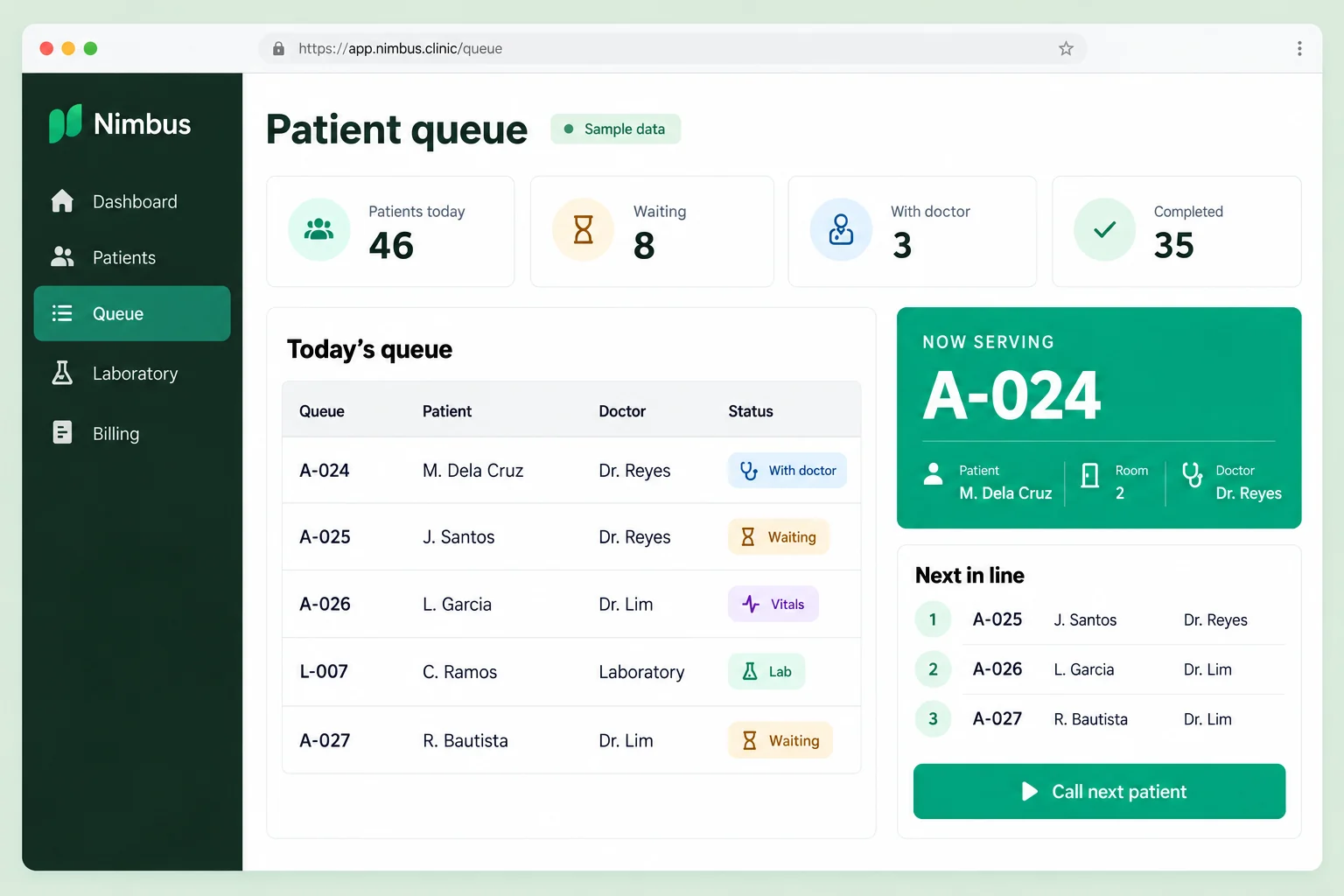
02 · Patient queue

Know who is next, at a glance.

See who is waiting, with a doctor or at the lab. Keep the next patient and the assigned doctor easy to find.

Illustrative interface with fictional patient data. Final screens may differ.

RedCloudApp Nimbus sample patient queue showing waiting patients, assigned doctors, visit statuses and the number now being served.

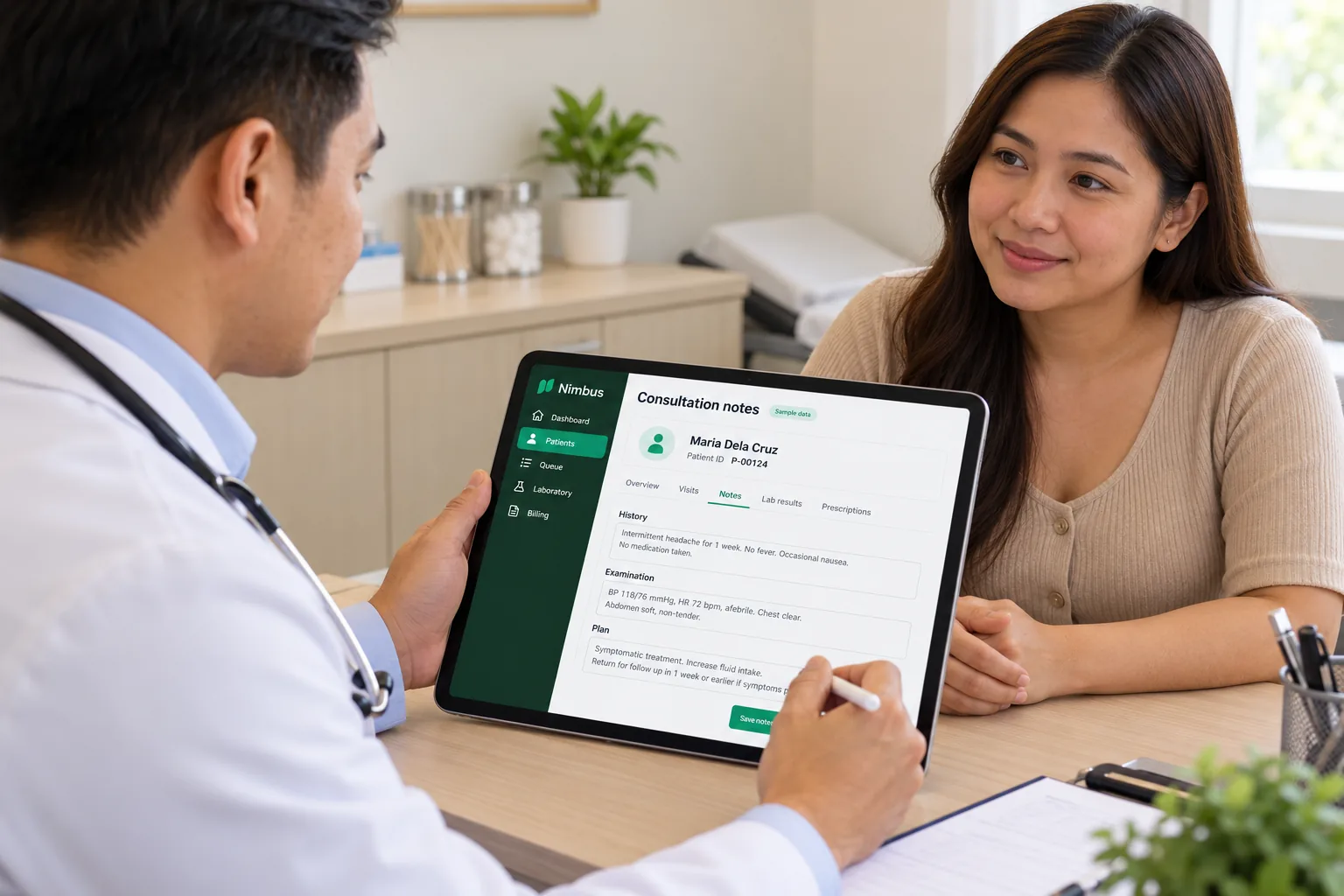
03 · Doctor consultation

More attention to patients. Notes close at hand.

Take consultation notes on a tablet while keeping the patient’s visit history, findings and care plan together in their record.

AI-generated clinic scene and concept interface.

Illustrative doctor taking consultation notes with a stylus in RedCloudApp Nimbus on a tablet while speaking with a patient.

04 · Patient lab results

Every result, in the right patient record.

Open lab requests and released results from the patient’s record, with collection dates, status and a printable result preview.

Illustrative interface with fictional patient data. Final screens may differ.

RedCloudApp Nimbus illustrative patient record with lab results linked to a sample patient, including released tests and a complete blood count preview.

A patient’s visit, start to finish

From the first queue number to the last receipt.

RedCloudApp Nimbus follows the way Philippine clinics already work, so your staff learn one simple flow instead of a new routine.

  1. Register

    New or returning patient, walk-in or appointment, cash or HMO.

  2. Queue

    A queue number per doctor, called from the front desk.

  3. Consult

    Vitals, notes, diagnosis and prescription in the patient record.

  4. Lab

    Requests tracked from order to release, with printable results.

  5. Bill

    Cash, card, e-wallet or HMO, with the approval code on file.

  6. Close the day

    Sales by doctor, service and payment type, ready for the owner.

Everything a clinic runs on

Less paperwork. More time with patients.

The daily workflows Philippine clinics rely on, connected in one place. We’ll walk through each one in your demo and confirm the setup your clinic needs.

Patient queueing

Issue queue numbers for walk-ins and appointments, call the next patient per doctor, and show who is being served on a waiting-area screen.

Front desk

Patient records & visit history

Personal details, vitals, chief complaint, diagnosis and notes in one record, with every past visit a click away.

Clinical

Doctors & their patients

Each doctor sees their own schedule, queue and patient list. Built for clinics with several doctors and clinic days.

Clinical

Lab requests & results

Follow every lab request from order to release, record results, and see which patients are still waiting.

Laboratory

Printing & documents

Print queue tickets, prescriptions, medical certificates, lab results and receipts with your clinic details.

Front desk

HMO tracking

Record each patient’s HMO, approval or LOA code and covered amount, then follow what is still unbilled or unpaid per HMO.

Billing

Billing & cashiering

Charge consultations, procedures and lab tests. Accept cash, card, e-wallet or HMO, and split a bill between patient and HMO.

Billing

Daily sales & reports

End-of-day sales by doctor, service and payment type, plus cash count and cashier shift handover.

Owner

Medicines & supplies

Keep track of the medicines and supplies used in the clinic, with low-stock reminders before you run out.

Operations

Small clinic or big clinic

Starts simple. Grows with your clinic.

Begin with the essentials, then add doctors, lab staff and branches as your practice grows.

Solo & small clinics

A doctor or two, a front desk and a lot of paper.

  • Simple queueing and patient records from day one
  • Daily sales without a separate spreadsheet
  • Runs in a browser on the laptop or tablet you already have
  • Print prescriptions, certificates and receipts

Multi-doctor clinics & diagnostic centers

Several doctors, a lab, a cashier and HMO patients every day.

  • A separate queue and patient list for each doctor
  • Lab request and release tracking
  • HMO balances followed per provider
  • Role-based access for front desk, doctors, lab and cashier

Room to grow

Your clinic. Your cloud. Your plan.

Choose by clinic size. Plans are coming soon. Request early access and we’ll contact you first.

Pricing coming soon

Coming soon

Mist

Basic

A simple start for a solo practice or a small clinic moving off paper.

Coming soon

Monthly and annual billing planned

Solo practice · small team

Request early access for Mist
Coming soon

Cumulus

Professional

More room for larger clinics with lab, cashier and HMO teams.

Coming soon

Monthly and annual billing planned

Larger clinic or lab

Request early access for Cumulus
Coming soon

Zenith

Enterprise

For multi-branch clinics, diagnostic centers and medical groups.

Let’s talk

Custom pricing for your organisation

Multiple branches · tailored access

Custom workflows and reports, scoped with your team.

Book a free demo for Zenith

Prices will be in Philippine pesos. Early-access requests go to our team; we’ll confirm plan details and the features available for your clinic before activation.

Questions, answered

What to know before you decide

When will RedCloudApp Nimbus plans be available?

Plans and pricing are being finalised. Request early access and our team will contact you first with plan details and onboarding dates.

Is RedCloudApp Nimbus for small clinics or big clinics?

Both. A solo practice can start with queueing, patient records and daily sales. Multi-doctor clinics and diagnostic centers add separate doctor queues, lab tracking, HMO follow-up and role-based access. Multi-branch groups can talk to us about Zenith.

Can RedCloudApp Nimbus track HMO patients and billing?

Yes. Staff record the patient’s HMO, approval or LOA code and covered amount, and RedCloudApp Nimbus shows what is still unbilled or unpaid per HMO. It tracks what your team records; it does not connect directly to HMO portals.

Can we print lab results, prescriptions and receipts?

Yes. Queue tickets, prescriptions, medical certificates, lab results and receipts print from the browser with your clinic details. Whether a printed receipt can be used as a BIR-registered receipt depends on your registration, so we review this with you during onboarding.

How is patient information protected?

Access is organised by role, so front desk, doctors, lab and cashier staff see what their work requires. We walk through access, consent and record keeping with your clinic during onboarding to support your obligations under the Data Privacy Act of 2012.

Do we need to install anything?

No. RedCloudApp Nimbus is a web app that runs in a modern browser on the computers and tablets your clinic already uses.

Read all frequently asked questions

Clinic guides

Guides for clinic owners and managers

Practical reading before you choose a clinic management system.