Picture a 12-room resort on Samal Island on a long weekend. A family walks in asking for two rooms. The phone rings with a guest who booked last week. Messenger has three new inquiries on the resort’s Facebook page, and a booking site has just sent another reservation. The front desk checks the notebook, the owner checks her phone, and both say Room 4 is free. Only one of them is right.
This guide is for small hotels, resorts, inns and pension houses in the Philippines that are thinking about a hotel management app. It explains what such an app should do first, how it compares with a spreadsheet or a booking site extranet, what to test on your phone, and which questions to ask before you pay for anything.
Key takeaways
- For a small property, the most valuable feature is a room calendar every staff member shares.
- Double bookings usually come from bookings arriving in several places: walk-ins, calls, Facebook and booking sites.
- A booking site extranet only shows its own bookings. It is not a full hotel app.
- Test the app on a phone, with your real rooms, before deciding.
- Ask which features are live today and which are planned, and get it in writing.
What is a hotel management app?
A hotel management app keeps your rooms, bookings and daily hotel work in one place, usually in a web browser or on a phone. Bigger systems are often called a PMS (property management system). They can cover reservations, check-in, housekeeping, billing and reports.
A 12-room resort does not need all of that on the first day. It needs everyone to see the same rooms and dates, so a free night is really free and a booked one is never sold twice.
Where double bookings come from
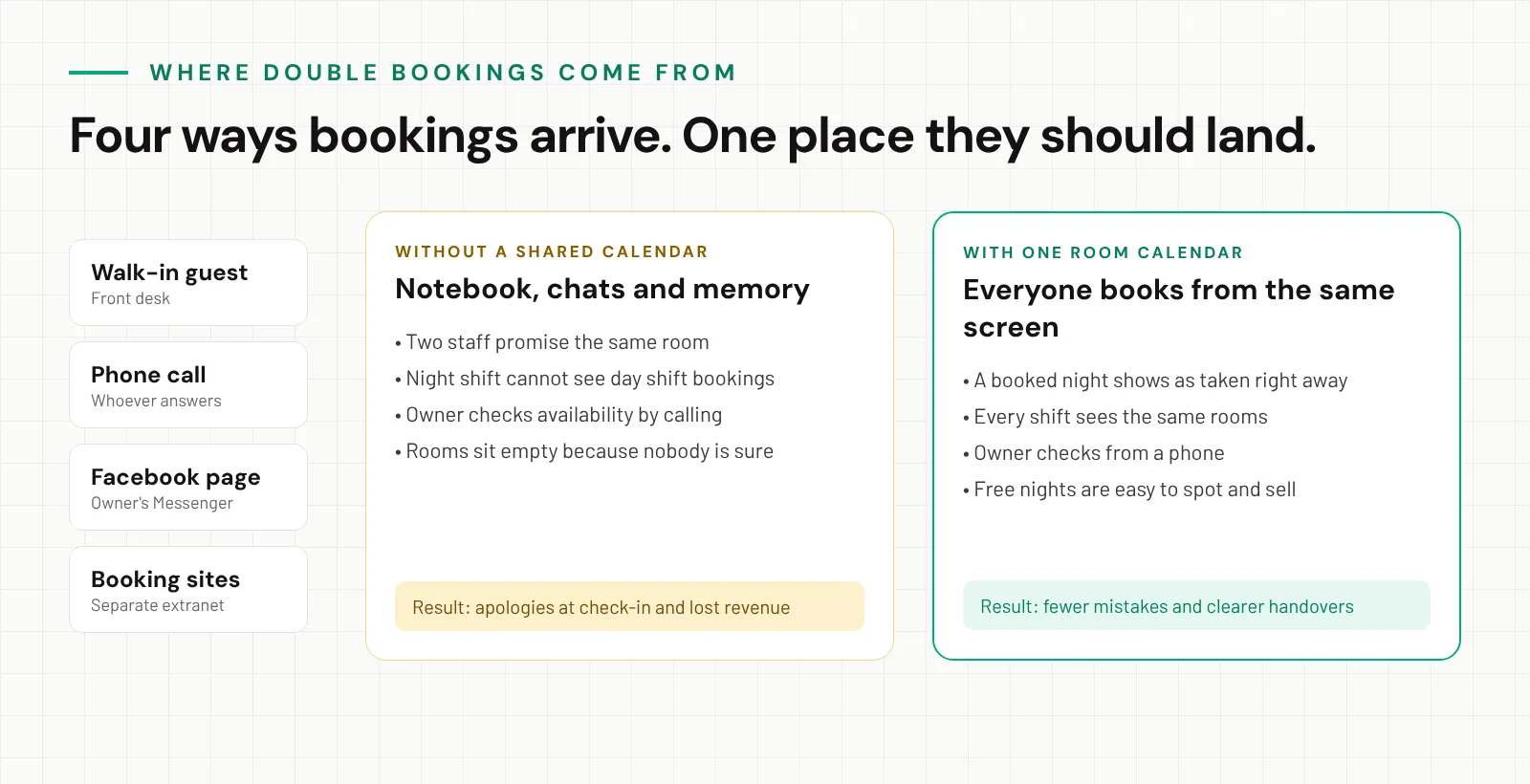
Most small properties do not have a booking problem. They have a “where did that booking go” problem. Bookings arrive through four or five doors, and each one is written down somewhere different:
- Walk-ins at the front desk, written in the logbook.
- Phone calls, taken by whoever answers.
- Facebook and Messenger, often on the owner’s phone.
- Booking sites, in their own extranet (the site’s private page for hotel owners).
- Travel agents and repeat guests, by text or email.
Spreadsheet, booking site extranet or hotel app?
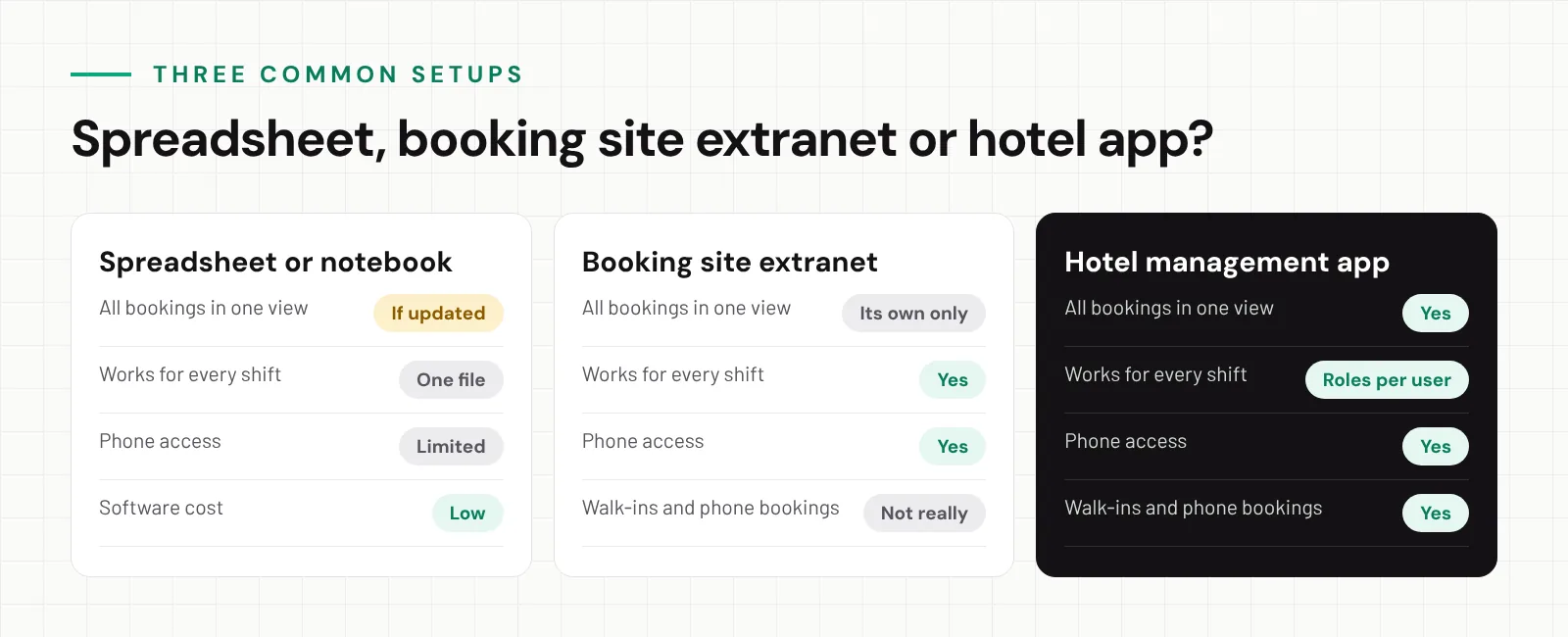
Many small properties already use one of these. Each has a place:
- A spreadsheet or notebook costs nothing and works when one person handles every booking. It breaks down with shifts, because only one copy is up to date.
- A booking site extranet is free with the site and works well for its own bookings. It does not show your walk-ins, calls or Facebook bookings, so it cannot be your only calendar.
- A hotel management app gives every booking, from every source, one home. Staff get their own logins, and the owner can check from anywhere.
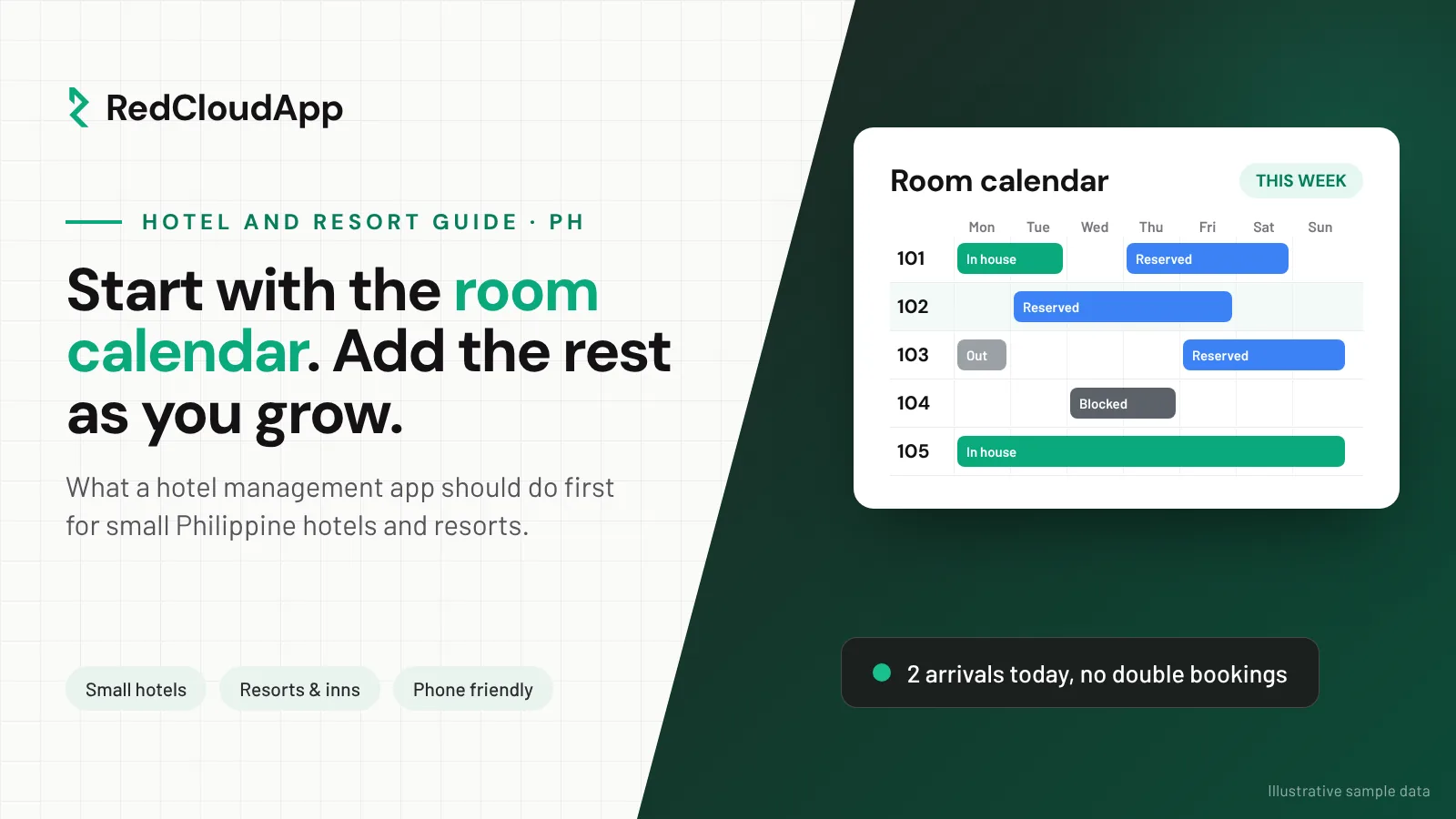
Get the room calendar right first
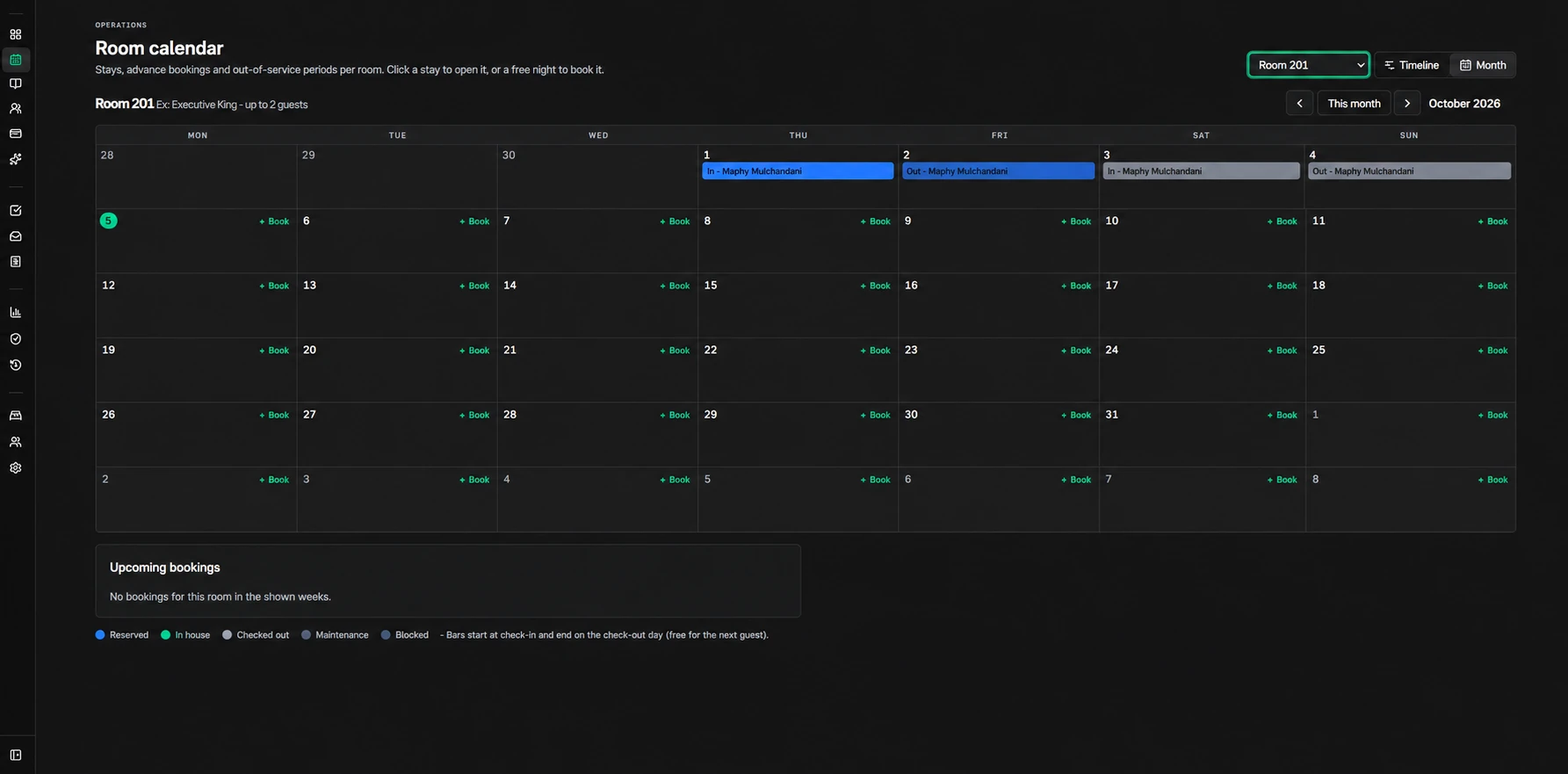
If your staff cannot read availability in a few seconds, nothing else in the app matters. When you look at any hotel app, check the calendar before anything else:
- Can you see a whole month for one room, and a timeline across all rooms?
- Are reserved, in-house, checked-out and blocked nights obvious without explanation?
- Can a free night be booked straight from the calendar?
- Can you mark a room out of service for repairs, so it is not sold?
Then add the rest, in this order
Once the calendar is in daily use, add the next parts as your team is ready. Adding everything at once is how small properties end up back on the notebook.
- Front desk and reservations: guest records, rates and check-in.
- Housekeeping: which rooms need cleaning and which are ready.
- Payments and folios: room charges, deposits and a clear checkout statement (the folio is the guest’s running bill).
- Shift and sales reports: a daily summary the owner can read from anywhere.
Real-world example
A 12-room resort on Samal Island
Before
Imagine a family-run resort with 12 rooms. The front desk keeps a logbook, the owner answers Facebook inquiries on her phone, and a booking site sends reservations to its own extranet.
Twice in one summer, two groups arrive for the same cottage. The owner spends the evening apologising and gives away a free night each time. Weekday rooms sit empty because nobody is sure what is really free.
After
Every booking, from every source, goes into one room calendar. Staff on each shift have their own login, and the owner checks the calendar from Davao City on her phone.
Booked nights show as taken the moment they are entered. Free weekday nights are easy to spot, so the owner posts a midweek promo on Facebook with dates she knows are open.
Illustrative scenario, not a named client.
Test it on your phone, not just a laptop
In a small property, the app will be used on phones: by the owner, by staff on the night shift and by whoever is at the pool when a guest asks. During the demo, open it on your own phone and try the screens you use most: today’s arrivals and departures, which rooms are free tonight and how to add a walk-in.
Ask about booking sites before you decide
Many hotel apps mention Agoda, Booking.com or other sites. A rate plan named after a booking site is not the same as a direct connection that updates availability automatically. Ask exactly what happens when a booking arrives from each site you use, and get the answer in writing.
Where RedCloudApp Cielo fits: live today and on the roadmap
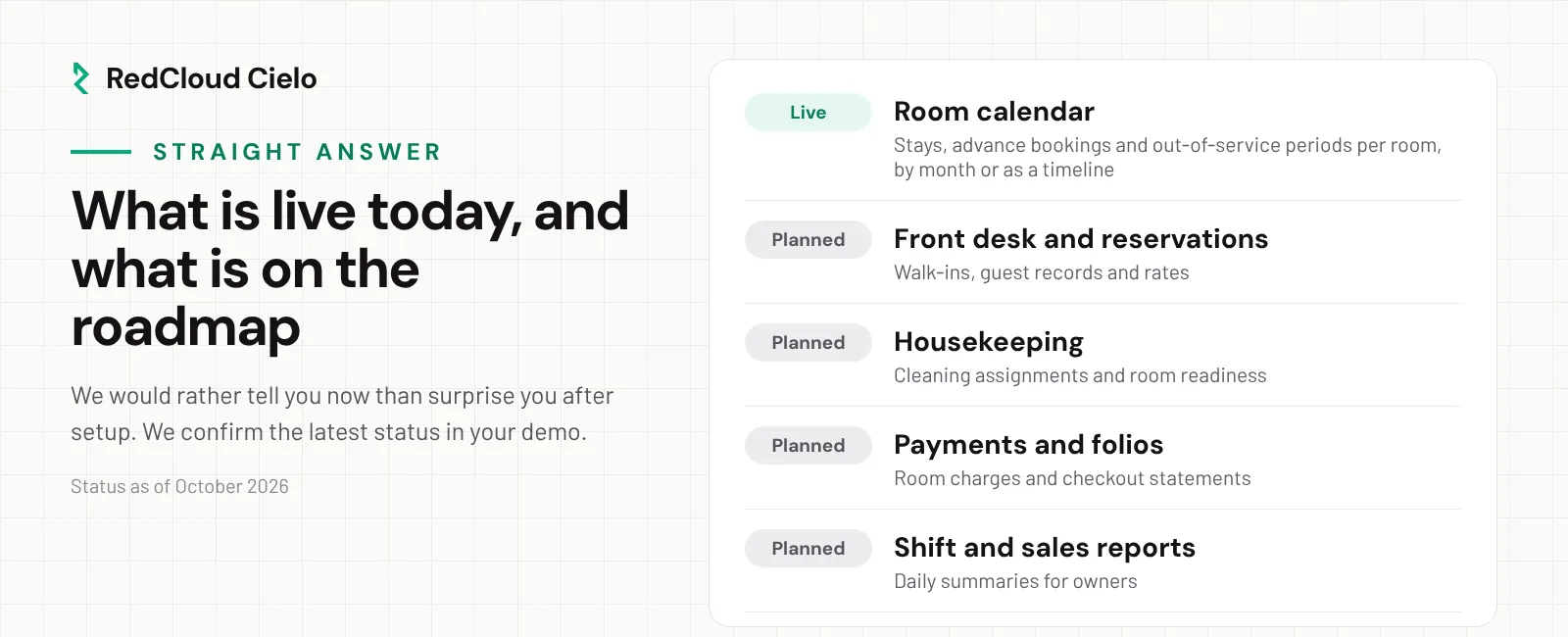
RedCloudApp Cielo is RedCloudApp’s hotel management app, built in Davao for Philippine hotels, resorts and inns. We would rather tell you the status now than surprise you after setup. As of October 2026, the room calendar is live: stays, advance bookings and out-of-service periods per room, in a month view or a timeline across rooms. Front desk and reservations, housekeeping, payments and folios, and shift reports are on the roadmap. We confirm the latest status in your demo.
Cielo has a 14-day trial and a 20% saving on annual plans. Plan prices are shared after a short discussion about your rooms and users.
- Built in DavaoCielo is designed and supported by our team in Davao City.
- Real product screensThe room calendar screenshot in this guide is the live product, not a mockup.
- 14-day trialTry it with your own rooms before you commit.
Questions to ask in any hotel app demo
- Can you set up my real rooms and show me this month?
- How do I add a walk-in from my phone?
- How do I block a room for repairs?
- How does a booking from a booking site get into the calendar?
- Can each staff member have their own login and limits?
- Which features are live today, and which are planned? Can you put that in writing?
- Can I export all my bookings and guest records?
For a wider checklist, read our guide to choosing a hotel management system in Davao, or see how we work with hotels and resorts in Davao.
Frequently asked questions
What is a hotel management app?
It is software, usually used in a web browser or on a phone, that keeps a hotel’s rooms, bookings and daily operations in one place. Larger systems are called a property management system (PMS). For a small property, the most important part is a shared room calendar.
Do small hotels and resorts need a hotel management app?
If more than one person takes bookings, or bookings come from walk-ins, calls, Facebook and booking sites, yes. A shared room calendar prevents double bookings and makes shift handovers clearer, even for 8 to 20 rooms.
Is a booking site extranet enough?
It shows the bookings made through that site. Walk-ins, phone calls and Facebook bookings still need another place, which is where double bookings start. A hotel app gives every booking one home.
Can I run a hotel management app from my phone?
With a cloud app, yes. In the demo, test the screens you use most on your own phone: today’s arrivals, departures and which rooms are free tonight.
Does RedCloudApp Cielo connect to Agoda or Booking.com?
Ask us to confirm before you decide. We do not claim a direct channel connection unless it is built. Tell us which booking sites you use and we will tell you in writing what is possible.
How much does a hotel management app cost in the Philippines?
It depends on the number of rooms, properties, users and features. RedCloudApp Cielo has a 14-day trial and a 20% saving on annual plans. Plan prices are shared after a short discussion about your property.