Ask a contractor when they found out a project lost money, and the answer is often “at the end.” The last progress billing goes out, the final supplier bills come in, and the numbers simply do not add up. By then there is nothing left to fix.
This guide is about construction cost tracking: how Philippine contractors can compare budget against actual cost while a project is still running, where the money usually leaks, and the one weekly check that catches most overruns early. It works whether you use spreadsheets or software, and it is written for owners, project engineers and site engineers alike.
Key takeaways
- Set up the budget by phase and cost item, the same way you will record spending.
- Every week, compare budget used with work done for each cost item. If spending runs ahead of progress, act now.
- Most material losses happen between delivery and use. Record each step.
- Price and sign change orders before the extra work starts.
- Spreadsheets can work for one project. Several sites usually need a shared system.
What construction cost tracking means
Cost tracking is recording every peso spent on a project against the budget for the part of the job it belongs to. That budget usually comes from your BOQ (bill of quantities, the itemised estimate of materials, labor and cost per work item). When a purchase, a payroll run or a subcontractor payment is recorded, it is tagged to the right project, phase and cost item.
The result is a running view of budget vs actual: for each part of the job, how much you planned to spend and how much you have spent so far.
Why overruns are found too late
- Receipts and delivery receipts sit in the site office for weeks before anyone records them.
- Payroll is computed from attendance notebooks, but never tagged to a project or phase.
- Materials bought for one site are moved to another without a record.
- Extra work is agreed verbally and never priced or billed.
- The budget is in one file, spending in another, and nobody compares them until the end.
Set up your budget the way you will track it
The simplest fix happens before the first purchase: break the budget into the same cost items you will record spending against. A common structure looks like this:
| Level | Example | Why it matters |
|---|---|---|
| Project | Two-storey house, Catalunan Grande | Separate profit and loss per job |
| Phase | Site works, foundation, structure, masonry, finishing | See which stage is going over |
| Cost type | Materials, labor, equipment, subcontract, overhead | Know whether the problem is price, waste or manpower |
| Cost item | Concrete works, rebar, CHB laying, electrical rough-in | Compare directly with your BOQ lines |
Keep it practical. Ten to twenty cost items per project is usually enough. Too many and nobody tags spending correctly.
The one check to run every week: budget used vs work done
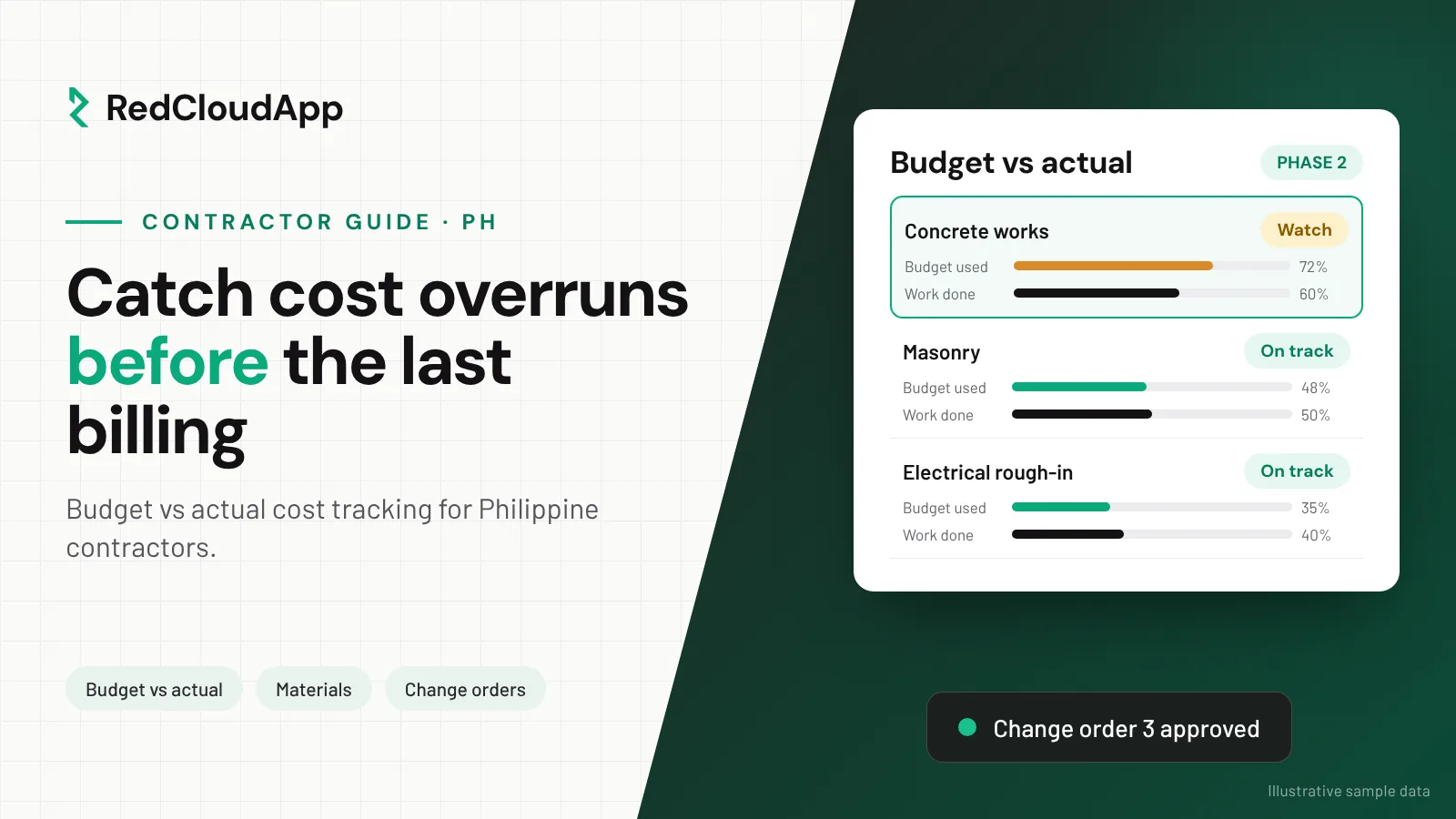
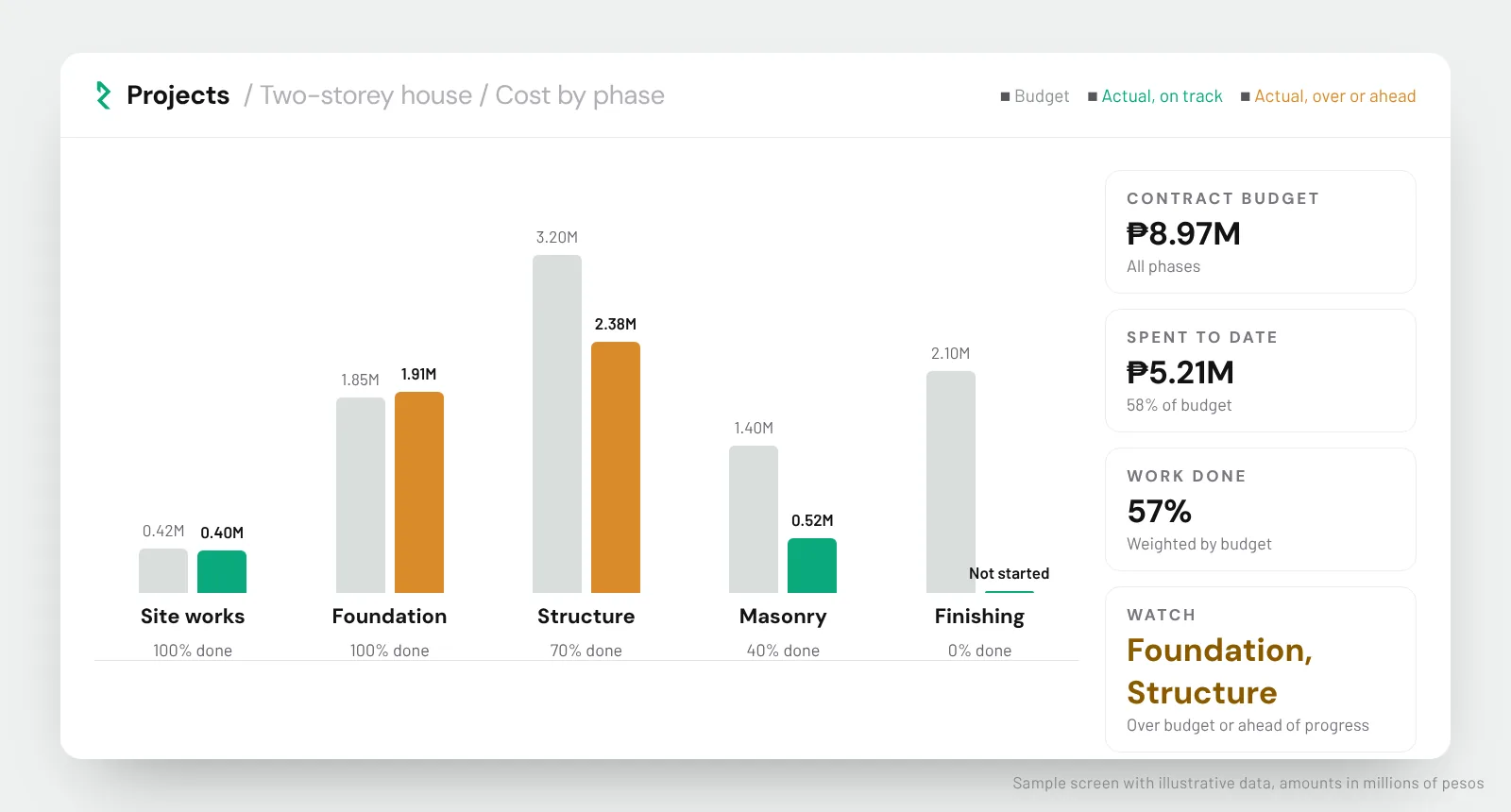
Spending alone does not tell you much. A cost item that has used 70% of its budget is fine if it is 70% done, and a problem if it is only 50% done. So compare two numbers for each item:
- Budget used: how much of that item’s budget is already spent.
- Work done: how much of that item is actually finished on site, from your site engineer’s accomplishment report.
If budget used is clearly ahead of work done, find out why this week: a price increase, wastage, rework, idle manpower, or work that has been done but not yet recorded.
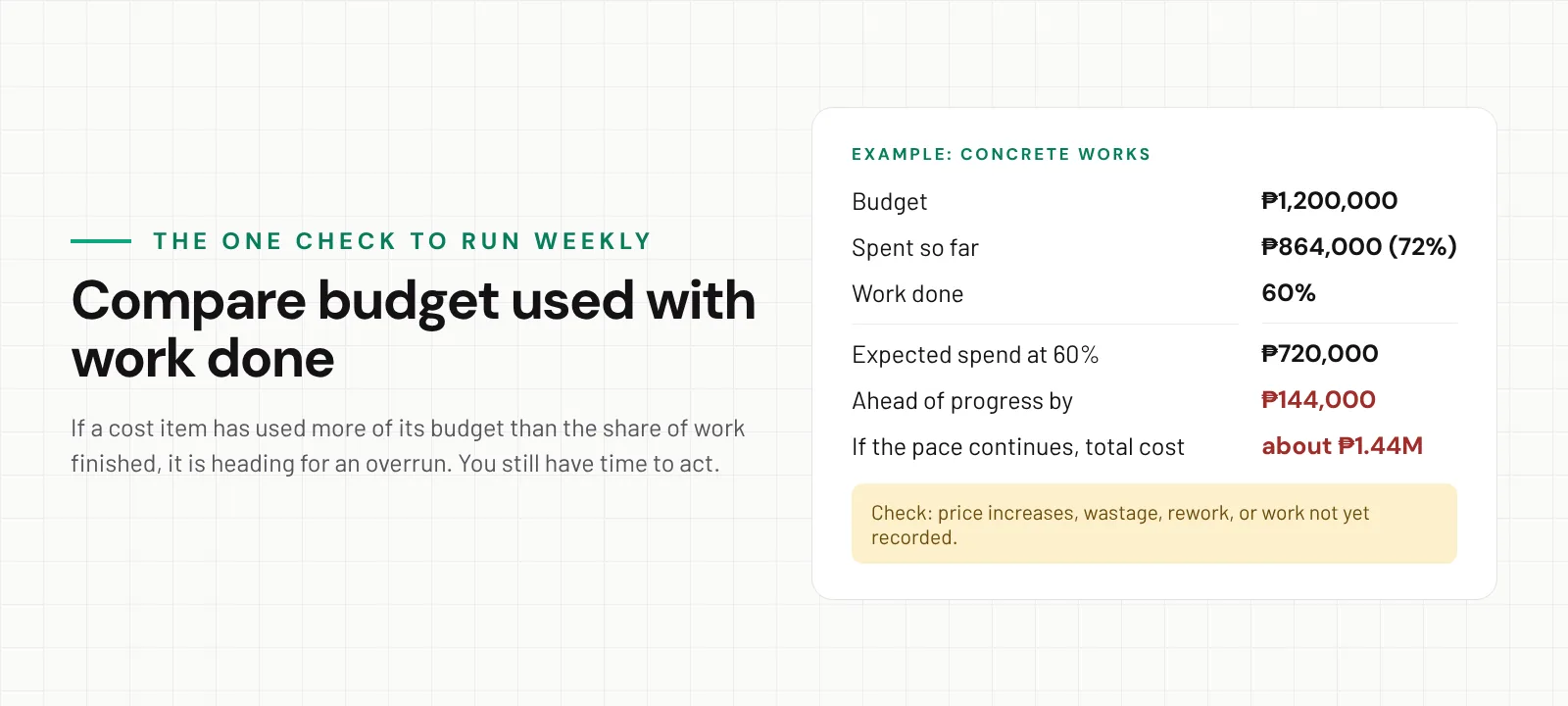
In the example above, concrete works has spent ₱864,000 of a ₱1.2 million budget (72%), but only 60% of the work is done. At 60%, you would expect to have spent ₱720,000. Spending is ₱144,000 ahead of progress. If nothing changes, the item finishes at about ₱1.44 million, or roughly ₱240,000 over budget. Found in week six, that is a problem you can still manage. Found at the final billing, it is a loss.
Real-world example
A contractor running three houses at once
Before
Imagine a Davao contractor building three houses at the same time, in Catalunan Grande, Mintal and Tagum. The BOQs are in Excel. Delivery receipts go into a folder at each site. Payroll is computed every Saturday from three foremen’s notebooks.
The owner finds out at the last billing that the Mintal house went ₱380,000 over budget, mostly on structure and labor. By then the client has paid, and the extra cost cannot be billed.
After
Each purchase, delivery and payroll run is tagged to a project and phase when it is recorded. Every Monday the owner opens one screen that shows budget used against work done for each house.
In week five, structure on the Mintal house shows spending ahead of progress. The site engineer finds rebar ordered twice and a crew waiting for a delayed concrete pour. The reorder is cancelled and the crew is moved to another site for three days.
Illustrative scenario, not a named client.
Where materials go missing, and how to stop it
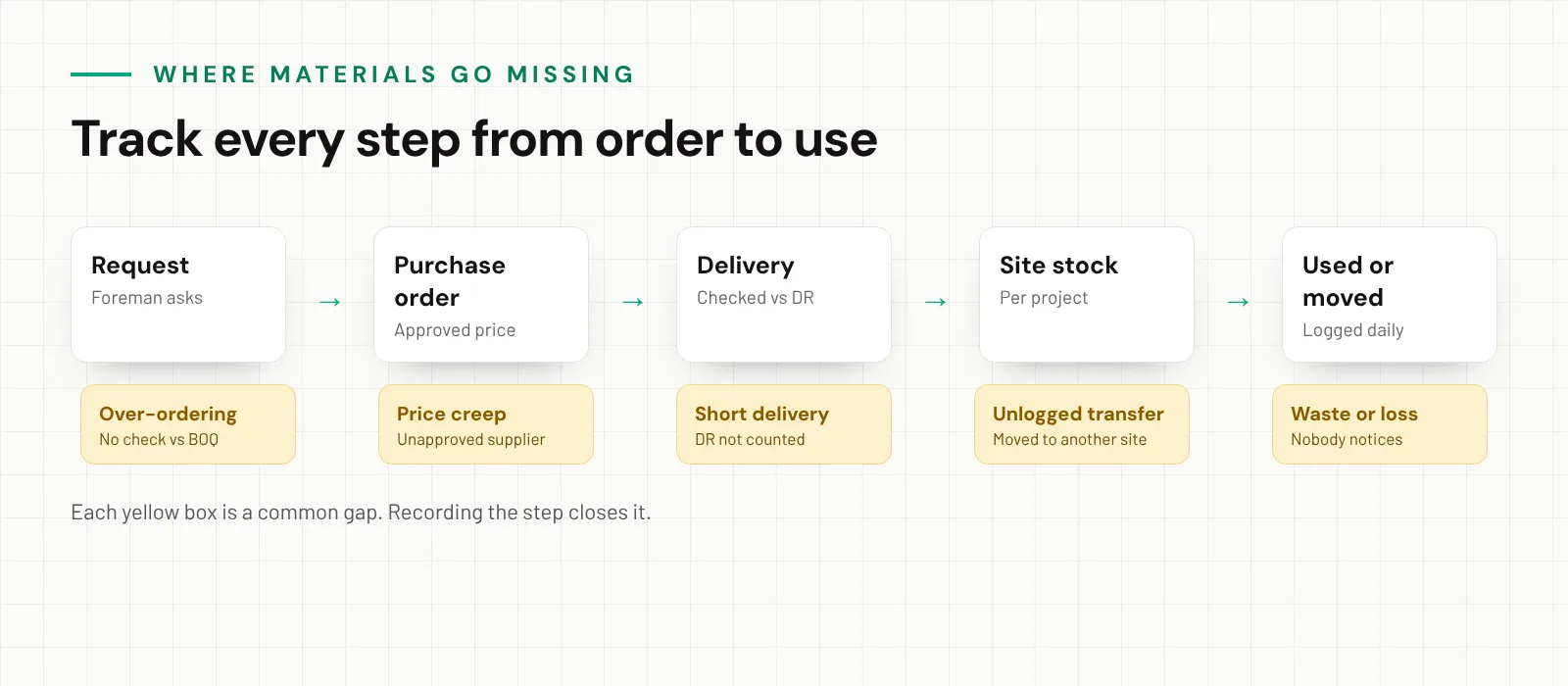
For most contractors, materials are the biggest cost and the biggest leak. The losses rarely happen in one place. They happen at each handover between people:
| Step | Common gap | What to record |
|---|---|---|
| Request | Over-ordering, no check against the BOQ | Quantity requested vs remaining BOQ quantity |
| Purchase order | Price creep, unapproved suppliers | Approved supplier, price and approver |
| Delivery | Short delivery, wrong items | Quantity received, checked against the delivery receipt (DR) |
| Site stock | Unrecorded transfers to other sites | Stock per site and every transfer |
| Use | Waste, theft, rework | Materials used per day in the site report |
Labor: daily rate, pakyaw and cash advances
Labor is the cost that is easiest to lose track of, because crews move between sites and are paid in different ways: daily rate, pakyaw (paid per finished job), overtime and vale (cash advances deducted on payday). Tag each worker’s days to a project and phase, and record pakyaw jobs against the cost item they belong to. Then labor appears in your budget vs actual view instead of only in the payroll total. See our payroll setup for how we handle this. Confirm SSS, PhilHealth, Pag-IBIG and tax rules with your accountant.
Change orders: price them before the work starts
Extra work agreed on site is one of the most common reasons a profitable job turns into a loss. Treat every change the same way:
- Write down what changed and why.
- Price it: materials, labor and time.
- Get the client’s approval in writing before the crew starts.
- Add it to the budget and to the next progress billing.
If a change order is approved in your system, it shows up in your budget and your billing. If it lives in a chat thread, it is usually forgotten.
Spreadsheet or construction software?
A spreadsheet can track costs well for one or two projects if one careful person updates it every day. It struggles when several sites, foremen and suppliers are involved, because everyone needs to record their part in the same place. That is the point where a shared system pays for itself. Our guide to construction management software in the Philippines covers what a full system should include, from site reports to progress billing.
Built for records that last
Construction and real estate records need to stay accurate for years: warranties, buyer payments, audits and the next project’s estimates all depend on them. RedCloudApp’s real estate system holds 15 years’ worth of data, and our inventory system has been used in its offline version by several companies for almost 10 years. Our construction tools are built on the same foundations.

- 15 years of dataOur real estate system holds 15 years of records, still searchable.
- Almost 10 yearsOur inventory system has been in real business use for almost a decade.
- Set up around your BOQWe load one of your real BOQs and build the cost items with you.
Questions to ask in a construction cost demo
- Can you load one of my real BOQs and show budget vs actual per cost item?
- How does a delivery get checked against the delivery receipt?
- How are materials transferred between sites?
- How do daily rate, pakyaw and cash advances show up against a project?
- How is a change order approved and added to the next billing?
- What does the owner see across all projects on one screen?
- Can I export all project and cost data at any time?
See our real estate and construction software or how we work with contractors and developers in Davao.
Frequently asked questions
What is construction cost tracking?
It is recording every cost on a project, such as materials, labor, equipment and subcontracts, against the budget for each phase and cost item. The goal is to see overruns while the job is still running, not after the final billing.
How often should a contractor compare budget and actual cost?
Weekly for active projects. A short weekly check of budget used against work done on each cost item catches most problems early enough to act.
Can I track construction costs in Excel?
Yes, for one or two projects, if one disciplined person updates it every day. It gets harder with several sites, many deliveries and payroll from different foremen, which is where construction software helps.
What is the difference between budget used and work done?
Budget used is the share of a cost item’s budget already spent. Work done is the share of that item actually finished on site. If budget used is clearly higher than work done, the item is heading for an overrun.
How do I stop materials from going missing on site?
Record each step: the request, the purchase order, the delivery checked against the delivery receipt, the stock at each site, and what was used or moved. Most losses happen between the delivery truck and the work.
Does RedCloudApp offer construction cost tracking software?
Yes. Our real estate and construction software covers budget against actual per project, phase and cost item, purchase orders, deliveries, site inventory and progress billing. Each setup is a custom plan with a written price.